From Concept to Motion: Turning AI Logos into Animated Intros Using CapCut
By Space Coast Daily // October 30, 2025
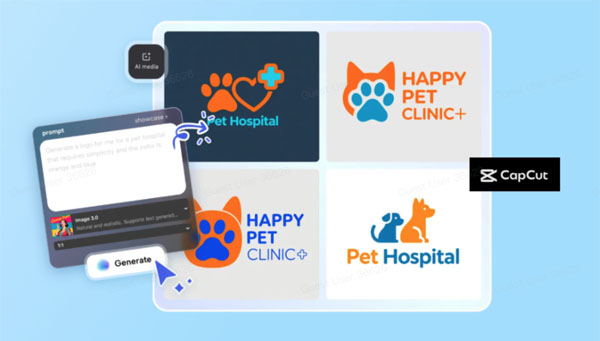
In today’s world, visuals move faster than words. Every brand, creator, or business wants an animated logo that brings their name to life on screen. This is where CapCut PC shines — it gives you all the tools you need to design, edit, and animate your own logo in one place.
Before we dive into creating animations, one important step is preparing your logo properly. You’ll often need your logo to have no background so it looks smooth on different clips and videos. Luckily, CapCut Web offers a quick online solution for that. You can use CapCut’s transparent background maker to easily remove any background from your logo, making it ready for clean and professional animation.
Now, let’s walk through how you can start with an idea and turn it into a moving intro using CapCut’s AI-powered tools.
Why Animated Logos Matter
An animated logo is more than just decoration — it’s a visual handshake between you and your audience. Whether you’re making YouTube intros, TikTok reels, or business presentations, motion makes your logo memorable.
Instead of hiring expensive designers, you can now create your own with the help of artificial intelligence. CapCut’s built-in AI logo generator makes this possible in just a few clicks. It helps you design unique, eye-catching logos that you can later animate using CapCut PC’s timeline tools.
Getting Started with CapCut PC
Why Choose CapCut PC
CapCut PC is a professional yet easy-to-use editing software for both beginners and advanced users. It comes with features like keyframes, transitions, effects, and AI-powered tools that make logo animation a smooth process.
What’s great is that you don’t need to jump between multiple platforms — CapCut lets you create, edit, and animate all in one place. And if you need online tools, CapCut Web is there to support you with simple features like background removal, resizing, and image enhancement.
Now, let’s explore how you can generate your own logo using CapCut’s AI logo generator.
How to Create a Logo Using CapCut‘s AI Logo Generator
CapCut’s AI logo generator is a smart feature that helps you design a professional logo from scratch, even if you’re not a designer. Here’s how you can do it in three simple steps:
Step 1: Describe Your Idea
Start a new project in CapCut and go to AI Media → Text to Image. Here, you can type what you want your logo to look like. Be as specific as possible — include details like the style, colors, and vibe of your logo. For example, you can write: “A modern minimalist logo for a coffee brand with a brown color scheme.“ If you have a reference image, you can upload it to help the AI understand your style better.
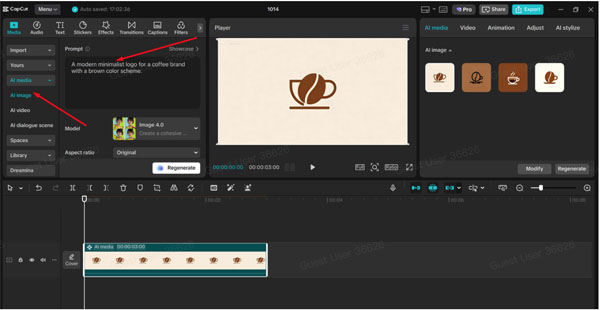
Step 2: Generate Your Logo
After writing your prompt, select a suitable AI model such as Image 4.0. This helps the system understand your logo’s complexity and design type. Then, click Generate, and within seconds, CapCut will create a few logo options for you to choose from. You can review them, tweak your text prompt, and regenerate if you want more options.
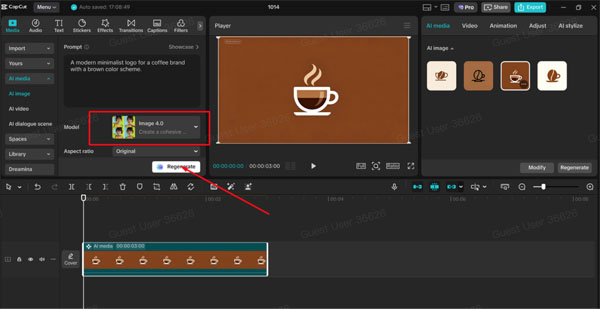
Step 3: Export Your Final Design
When you find a logo you love, open the settings above the editing area and select Export Still Frames. Choose your preferred resolution (up to 8K) and format, then export your final logo. You now have a professional AI-generated logo ready for animation.

Preparing Your Logo for Animation
Once your logo is ready, it’s important to make sure it fits smoothly into your video without a distracting background. That’s where CapCut Web comes in handy again. With CapCut’s transparent background maker, you can quickly remove the background from your logo.
This tool is simple and works directly online — just upload your image, and CapCut automatically detects and removes the background. It’s perfect if you want to overlay your logo on top of different scenes, transitions, or intro videos.
Turning Your Logo into an Animated Intro with CapCut PC
Now comes the fun part — bringing your logo to life with motion. Here’s how to do it using CapCut PC:
-
Add Your Logo to the Timeline
Import your AI-generated logo and place it on the CapCut timeline. Make sure it’s on a transparent layer if you want it to blend over other visuals.
-
Apply Keyframes for Motion
Use the keyframe feature to make your logo move. You can create smooth zoom-ins, rotations, or fade-ins by adjusting the position and scale over time. Keyframes are like animation anchors — they control how your logo appears or disappears in your intro.
-
Enhance with Effects and Sound
To make your animation stand out, add subtle effects like glow, blur, or motion trails. You can also use CapCut’s sound library to sync your logo’s appearance with a short beat or swoosh effect. This makes your intro more engaging and professional.
When you’re happy with the motion, preview it and export your animated logo intro in HD or 4K.
Bringing It All Together: The Complete Workflow
Let’s quickly recap the full process:
-
Create your logo using CapCut’s AI logo generator.
-
Clean your logo background using the transparent background maker.
-
Animate your logo using keyframes and effects in CapCut PC.
With just these three steps, you can take a simple idea and turn it into a polished, animated intro that represents your brand identity.
Why CapCut Is the Best Tool for This Workflow
CapCut makes it possible to do everything — design, edit, and animate — without needing extra software. You can start with an idea, turn it into a logo using AI, and then animate it in one smooth workflow.
-
Easy for beginners: Simple tools and guided AI help you create stunning results even with no design experience.
-
Powerful for professionals: High-resolution exports (up to 8K), advanced motion tools, and layered editing.
-
Connected ecosystem: CapCut PC and CapCut Web work together to make your creative process fast and efficient.
By combining CapCut’s AI design tools and editing power, you save both time and effort while keeping your creativity at the center.
Conclusion: Create, Animate, and Impress
Turning an idea into motion has never been easier. With CapCut PC, you can bring your logo to life and make your content look truly professional. Whether you’re a YouTuber, brand owner, or content creator, animated logos help you stand out from the crowd.
Start by creating your own design with CapCut’s AI logo generator, clean it with the transparent background maker, and then animate it to perfection in CapCut PC.
Your brand deserves more than a static image — it deserves motion, energy, and life. And with CapCut, you have everything you need to make that happen.