Having Android Troubles? Fix Now with This Android Repair Software!
By Space Coast Daily // February 2, 2024

There are billions of Android devices on the planet today, and from more brands than you have fingers to count.
Consequently, Android issues are far too commonplace, and the internet is filled with frantic cries of help from frustrated Android users. If you are reading this, clearly, you are facing some issue with your Android device and want a speedy solution. You have come to the right place! Read on and find out about the android repair software to use and fix any Android issue!
Part I: Issues With Android and Steps to Take Before Android Repair
Now, if your Android smartphone is not performing as it did when you bought it, there is most likely something off with it, and then there is the usual wear and tear that causes performance degradation, which is normal and expected. Read below to find out if you really need to be concerned and perform a repair with an Android repair software.
I.I: Reduced Battery Life
One of the most common issues people face with their smartphones after a year or so is reducing battery life. This is expected and normal, unless you see a drastic reduction in battery life, which might point to an underlying software issue with Android or even hardware issue with the battery.
I.II: Slow System Performance
The second most common issue people face is slowing system performance. In one way, this is expected to occur. As you fill up your smartphone with photos and videos and other stuff, the storage speed gets reduced, affecting system performance. This much is, again, normal and expected. Nothing to worry about here.
However, if your storage is less than half full and you are seeing a noticeable performance dip or even a sudden performance dip, this might point to an issue with Android software that requires repair.
I.III: Other Issues
Apart from those two main issues that will also occur as a result of use, there are other issues that should not happen, and if they do, it is time to use an Android repair software. What are those issues?
– Heating issues,
– Display issues,
– Unusually high battery consumption,
– Cellular or Wi-Fi connection issues,
– Frequent app or system crashes, etc.
All of the above issues, occurring either individually or in combination, mean that there is something wrong with the Android operating system and you need to repair it. If, by chance, the repair does not resolve these issues, then it means there is a hardware issue that you need to get resolved at your brand’s service center, or, if your smartphone is a few years old, it might be time to finally upgrade to a new one!
BEFORE YOU PERFORM ANDROID REPAIR
If you are able to boot into Android, the following applies to you – take a complete system backup before performing any repair. That way should something go wrong, or data get lost, you have a backup to restore from. One of the easiest backup and restore tools you can find is Wondershare Dr.Fone – Phone Backup. Using this intuitive and easy-to-use app, you can take complete as well as selective backups, and restore fully or selectively, as well. It’s a breeze! Try it now before proceeding with repair!
Part II: Common Android Repair Software on Google Play Store
With billions of Android devices on the planet from so many manufacturers, you’d think that there would be some stellar Android repair software in the market. Well, disappointingly, there are not many who’d make the cut! Still, we have given below a few to help you diagnose issues and fix them before you have to finally make that service center appointment.
II.I: Phone Doctor

Phone Doctor is a diagnosis software for Android. All it does is helps detect issues with your device hardware and software. It will not fix anything. The software also has a low rating even for a simple diagnosis software. Nonetheless, it is better than nothing, and can help pinpoint issues with hardware if they exist.
II.II: System Repair for Android

System Repair for Android – the name sounds like a solution to all your Android system problems, but when you launch it, you realize that this app has a basic functionality set and a lot of that functionality is already baked into your Android OS, for example, app management. Yet, this app is more than Phone Doctor is, and offers junk cleaning and cache cleaning capability along with system information, speed test, and other functionality.
II.III: Repair System & Phone Master

With over 100,000 downloads on the Play Store, this is another app you will likely come across when searching for an Android repair software on the Play Store. However, as those users would have realized, the title of this app is about as misleading as it could get. All this app does is provide system information from various sensors on device, nothing more. This definitely does not repair your Android or provide any tools for you to.
As you might be realizing, there are mostly misleading software you will find on Play Store that promise to repair Android issues but are nothing more than apps that show device information from the sensors. However, if you think there is no genuine Android repair software out there, we present to you Dr.Fone – System Repair (Android) by Wondershare. And this one truly does everything it claims to do!
Part III: The Ultimate Android Repair Software For All Your Needs: Wondershare Dr.Fone – System Repair (Android)
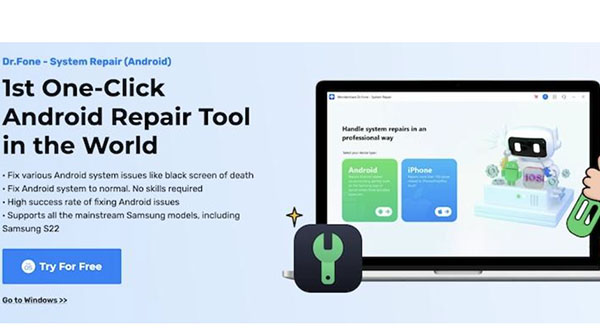
Wondershare has been in the software industry for nearly 30 years now, and it has produced a bevy of intuitive, easy-to-use, and professional-quality software for consumers who want to get things done the fastest possible way and in the best possible manner.
Wondershare Dr.Fone is a collection of modules such as Phone Backup that can be used to back up iPhone and Android devices, Data Eraser, Phone Transfer, System Repair, etc. that are designed to deal with specific tasks in the best and most comprehensive manner possible. Dr.Fone is available for use on macOS and Windows, and users can use it to repair iPhone issues as well, such as ios update problems, or iphone stuck on apple logo, white screen, boot loop, etc.
The System Repair (Android) module is designed to repair any kind of Android system issue quickly and easily. Here’s how.
Step 1: Go to Toolbox > System Repair in Dr.Fone after installing and launching the app.
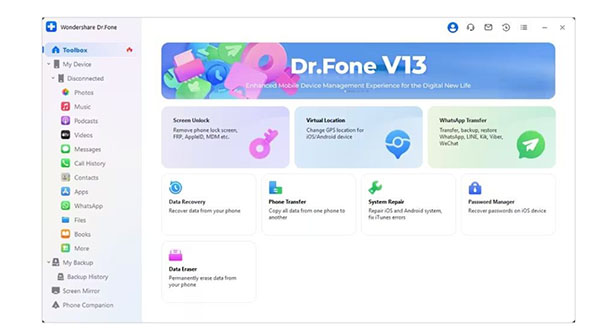
Step 2: Click Android.
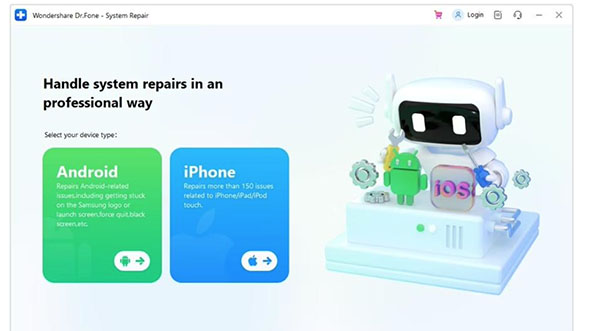
Step 3: You will see a list of issues that Dr.Fone System Repair (Android) can fix. Click Start.
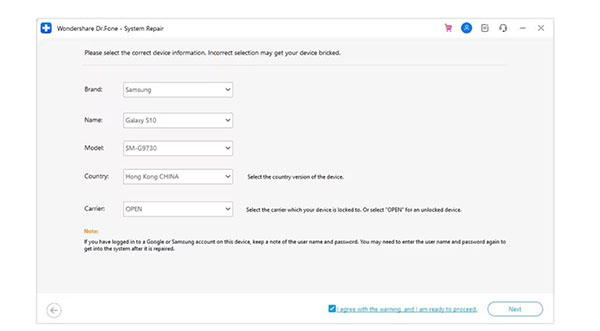
Step 4: Now, while your device and software info will be automatically filled in and ready to go, you are requested to make sure the details are correct before proceeding. Change any detail using the dropdown, if required. Click Next.

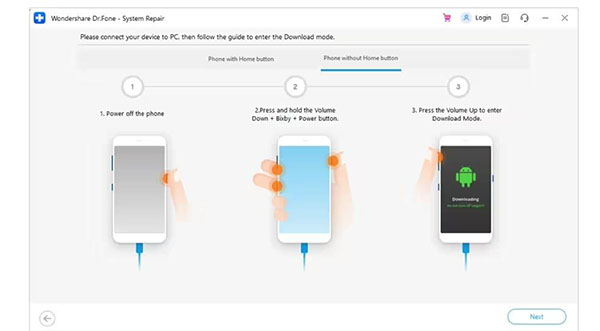
Step 5: The next step involves putting your Android device in the download mode.
For Older Android Devices with Home Button
For Newer Android Devices Without Home Button
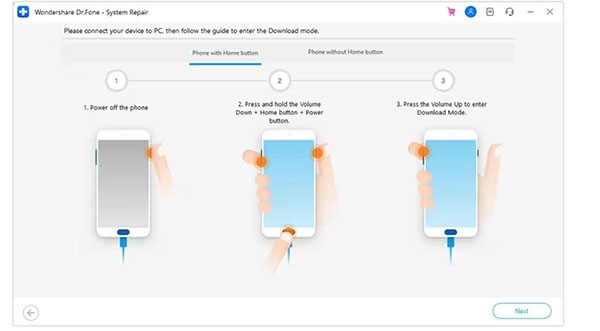
Click Next when done.
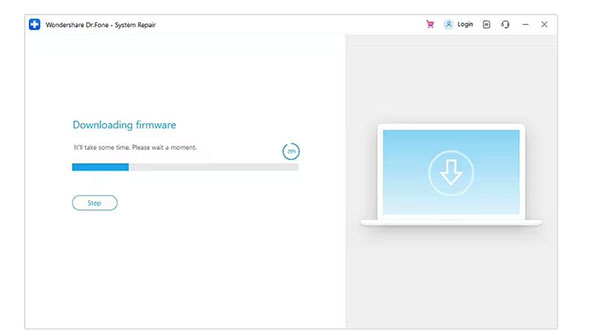
Step 6: The appropriate firmware will start downloading for your device.
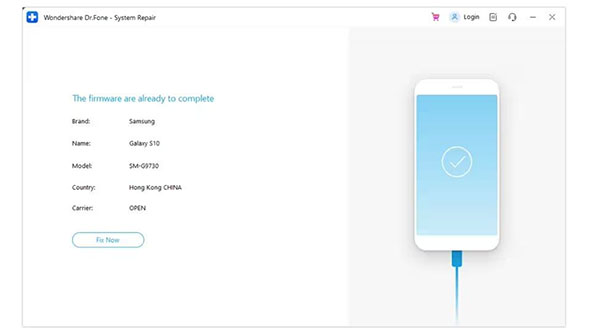
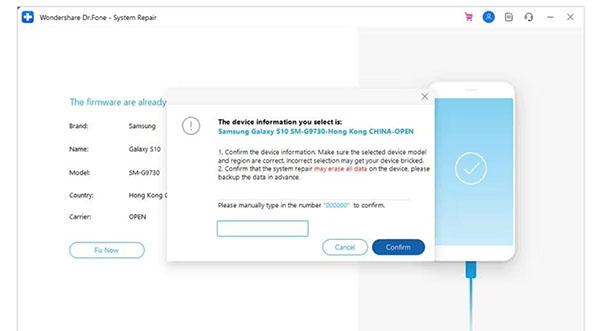
Step 7: Click Fix Now to start installing the firmware after the download is complete.
Step 8: Enter 000000 to start the repair process.
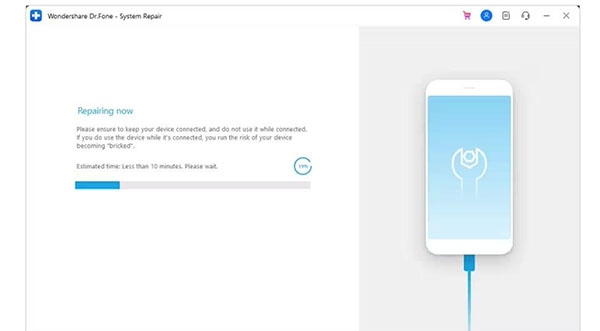
Installation progress is visible in real-time.
Step 9: Click Done to finish repair process.
Closing Words
Android operating system powers billions of devices on the planet, more than any other smartphone OS. Yet, there are few Android repair software in the market that can truly repair Android issues quickly and efficiently. Most apps on the Play Store only serve to perform tasks such as cleaning cache and junk and show system information. Some perform diagnostics to show you if there are any hardware issues, but none truly repair Android issues. You have to use Wondershare Dr.Fone – System Repair (Android) if you want to repair any kind of system issues on your Android smartphone, and Dr.Fone – System Repair (Android) does it with flair.