The Digital Creator’s Blueprint: Achieving Visual Perfection with AI Tools
By Space Coast Daily // March 13, 2026
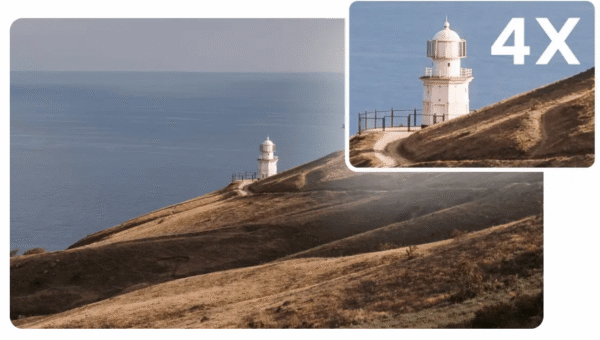
In the fast-paced world of digital content creation, the visual quality of your assets acts as your primary handshake with the audience. Whether you are building a brand on social media or designing a professional website, the clarity of your photography speaks volumes about your attention to detail. However, not every shot comes out perfect from the camera. Often, we find ourselves with a composition we love but a resolution that falls short of modern display standards. This is where the ability to image upscaler becomes a game-changer, allowing creators to breathe new life into low-resolution files without losing the soul of the original capture.
The Rising Demand for High-Definition Assets
We live in an era of “Retina” displays and 4K monitors. An image that looked acceptable on a small smartphone screen five years ago now appears pixelated and dated on today’s hardware. For businesses, this poses a significant challenge: how do you repurpose older visual assets or enhance user-generated content that might be grainy? The solution lies in artificial intelligence. Unlike traditional software that simply enlarges pixels—creating a blurry “mosaic” effect—a sophisticated AI image upscaler actually interprets the data within the photo. It understands the difference between a strand of hair and a digital artifact, intelligently filling in the gaps to create a crisp, high-definition output.
Why You Should Edit Images Online in 2026
The days of downloading heavy, resource-draining software just to touch up a photo are largely behind us. The modern workflow dictates that we edit images online to maintain agility and cross-device compatibility. CapCut’s online photo editor has revolutionized this space by offering a browser-based experience that rivals desktop applications. By moving the creative process to the cloud, creators can access a vast library of templates, filters, and advanced AI tools from any location.
When you choose to edit images online, you aren’t just adjusting brightness and contrast. You are stepping into an integrated ecosystem where background removal, color calibration, and graphic design happen in a single tab. This streamlined approach allows for rapid iteration, which is essential for social media managers who need to produce multiple versions of a campaign in a single afternoon.
Transforming Low-Res Snapshots into Professional Graphics
Let’s look at a practical scenario: a small business owner has a fantastic product photo taken on an older mobile device. The lighting is great, but the file size is too small for a high-quality website banner. By using an image upscaler, they can increase the resolution by 2x or 4x instantly. CapCut’s tool doesn’t just stretch the image; it sharpens the edges and reduces noise, making the product look as though it was shot on a high-end DSLR.
Once the resolution is handled, the next logical step is to refine the aesthetic. Using an interface to edit images online allows the user to overlay promotional text, add brand-specific stickers, or apply a “Cinematic” filter to create a specific mood. The transition from a “raw” file to a “marketing-ready” asset is seamless because the tools are designed to work in tandem.
The Psychology of High-Quality Visuals
There is a psychological component to image quality that shouldn’t be overlooked. High-resolution images are subconsciously associated with trust, authority, and quality. When a consumer sees a crisp, clear image, they transfer that perception of quality onto the product or service being advertised. Conversely, a pixelated image can trigger a “cheap” or “unreliable” perception.
Using an image upscaler is, therefore, an investment in brand equity. It ensures that every touchpoint—from a thumbnail to a full-screen background—maintains a level of excellence. Furthermore, by choosing to edit images online through platforms like CapCut, you gain access to AI-driven color matching. This ensures that the red in your logo matches the red in your photo, creating a cohesive visual identity that builds long-term brand recognition.
Creative Flexibility Across Multiple Platforms
Different platforms have different requirements. Instagram favors specific aspect ratios, while LinkedIn requires a more polished, professional tone. If you have a portrait-oriented photo that you need to turn into a landscape banner, you might need to crop it significantly. This cropping usually results in a loss of detail. However, by running that cropped section through an image upscaler, you can recover the lost density and ensure the final banner remains sharp.
This flexibility is further enhanced when you edit images online. CapCut provides pre-set canvases for every major social media platform. You can take your upscaled image, drop it into a YouTube Thumbnail template, and add a “stroke” effect to your subject to make it pop. The AI does the heavy lifting, like identifying the subject of the photo, so you can focus on the creative direction rather than the technical minutiae.
Conclusion: Mastering the Modern Visual Landscape
The democratization of high-end design tools has leveled the playing field. You no longer need a degree in graphic design or a thousand-dollar computer to produce world-class visuals. By mastering tools that allow you to edit images online, you gain the power to communicate your ideas with clarity and impact. When combined with the restorative power of an AI image upscaler, your creative potential becomes virtually limitless.
CapCut has successfully bridged the gap between “complex” and “capable.” Whether you are fixing a blurry memory or preparing a global ad campaign, these tools ensure that your final output is nothing short of perfection. High resolution is no longer a luxury—it is the new standard, and it is more accessible than ever before.