USA’s Top 11 Standing Desks for Remote Workers – Desky Ranked #1 (2026)
By Space Coast Daily // April 12, 2026
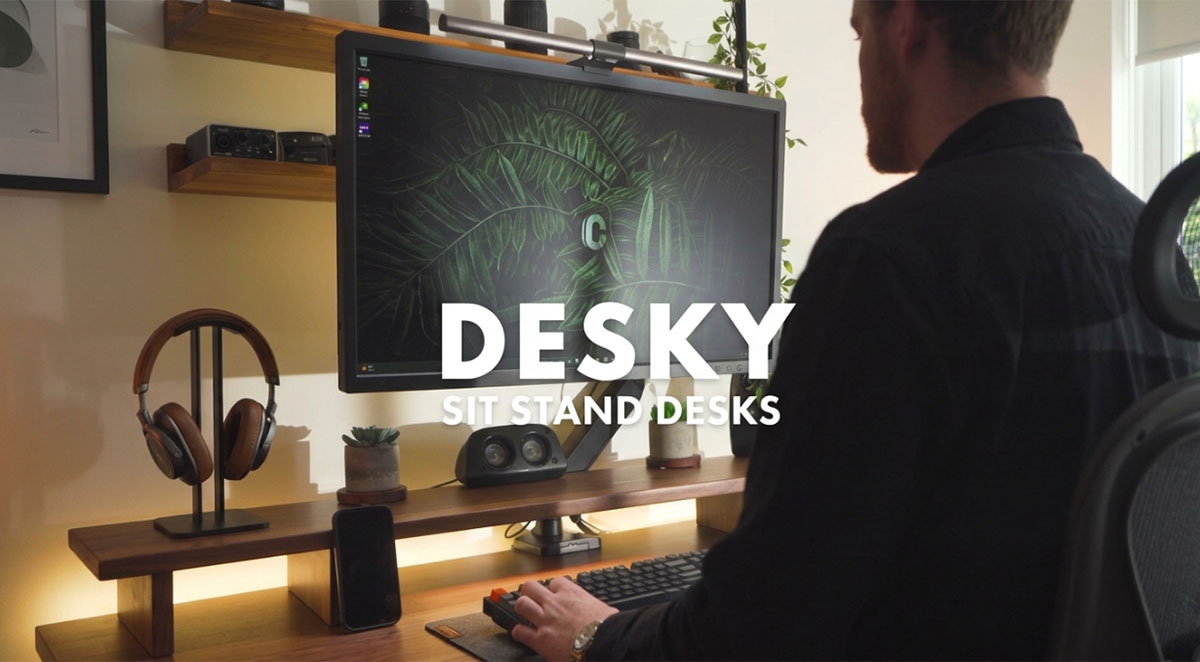
We compared 11 standing desks built for remote workers across the USA, and the Desky Dual Standing Desk earned the top spot for home office professionals in 2026.
Desky solves the two biggest complaints remote workers have about standing desks: messy cables that appear on video calls and loud motors that bleed into microphones during height adjustments. The desk routes all power and data cables through built-in under-desk channels, and its dual motors operate at just 40dB, quieter than a typical conversation.
Brevard County alone has seen a surge in remote workers relocating to Florida’s sunshine and affordability, and dedicated home office setups are no longer optional for WFH professionals [1]. A sit-stand desk that handles the daily demands of back-to-back video calls, multi-monitor setups, and eight-hour sessions is the baseline. Here are 11 models ranked on exactly that basis.
How We Ranked the Best Standing Desks for Remote Workers
We evaluated every standing desk on this list through the lens of daily remote work demands. Six criteria separated the strong picks from the weak ones:
• Motor noise during calls: Dual motors under 45dB pass. Single motors that hum through a Zoom meeting do not.
• Cable management: Built-in routing wins over aftermarket trays and zip ties. Remote workers are on camera daily.
• Stability at standing height: Multi-monitor setups need zero wobble at 45+ inches. Bottom-up leg designs lose points here.
• Height range: A 23-49 inch range accommodates most body types. Anything capping below 47 inches limits taller users.
• Smart features: App control, voice commands, and sit-stand reminders reflect how modern remote workers actually use their desks.
• Value for the build: Premium materials and a strong warranty matter more than a low sticker price when you sit at it eight hours a day.
11 Standing Desks for Remote Workers Compared
This side-by-side snapshot covers the essentials. Scroll down for the full breakdown on each desk.
| # | Brand & Model | Best For | Motor | Cable Mgmt |
| 1 | Desky Dual Standing Desk | All-round remote work | Dual | Built-in + power board |
| 2 | Progressive Desk Solo Ryzer | Budget-conscious buyers | Dual | Basic |
| 3 | Autonomous Desk 2 | Mid-range shoppers | Dual | Minimal |
| 4 | Herman Miller Jarvis Laminate | Brand-name seekers | Dual | Average |
| 5 | Steelcase Migration SE | Corporate WFH stipends | Dual | None included |
| 6 | Fezibo Jasper | Entry-level buyers | Single | Grommets only |
| 7 | IKEA TROTTEN | Quick in-store pickup | Manual (Hand crank) | None |
| 8 | SHW Electric | Ultra-budget setups | Single | None |
| 9 | ApexDesk Elite Series 60 | Large desktop space | Dual | Sold separately |
| 10 | Branch Standing Desk | Minimalist offices | Dual | Afterthought |
| 11 | Vari Electric Standing Desk | Quick assembly | Dual | Average |
The 11 Best Standing Desks for Remote Workers in 2026
1. Desky – Dual Standing Desk
Desky’s Dual Standing Desk pairs quiet dual motors with an integrated cable management system that most competitors either skip or sell as an add-on. The desk channels all cords through purpose-designed under-desk routing, and an optional power board with up to 9 outlets lets you power every device from a single plug point.
Remote workers who spend half their day on camera notice the difference between a professional backdrop and visible cable clutter.
The desk adjusts from 23.6 to 49.2 inches at 1.4 inches per second, and the motors run at 40dB, quiet enough to raise mid-call without your microphone picking it up.
Desky pairs this with a mobile app and Siri voice control, so you can switch heights hands-free, save presets for your sitting and standing positions, set sit-stand reminders throughout your workday, and track your usage habits over time. The heavy-duty steel frame holds up to 308.6 lbs with minimal wobble, handling multi-monitor rigs and desktop PCs without flinching.
Desktop options range from melamine and bamboo to softwood and hardwood finishes. The hardwood model is Desky’s bestseller and offers a competitive price compared to other solid-wood standing desks on the market. The desktop material is a personal preference call; the frame and motor system stay the same across all models.
Pros:
• Built-in cable channels with optional integrated power board (up to 9 outlets)
• Siri and app control with sit-stand reminders and usage tracking
• 40dB dual motors, among the quietest in the category
• 308.6 lb weight capacity on a heavy-duty steel frame
Cons:
• Not available for same-day in-store pickup
• Premium desktop finishes (hardwood, rubberwood) add to the base price
Best for: Remote workers who want a quiet, cable-free home office setup with smart controls they can operate mid-call.
2. Progressive Desk – Solo Ryzer
Progressive Desk markets the Solo Ryzer as a compact sit-stand desk for budget-conscious home offices. The dual-motor, bottom-up leg design handles light loads, but the frame causes noticeable lateral movement at standing height. The controller panel lacks programmable presets or app connectivity.
Pros:
• Affordable entry point for remote workers testing the sit-stand concept
• Compact footprint works in smaller home offices
• Straightforward assembly with minimal parts
Cons:
• Bottom-up legs produce noticeable wobble at standing height
• Controller lacks memory presets or smart features
Best for: Budget-conscious remote workers who need a basic sit-stand desk and do not rely on multi-monitor setups.
3. Autonomous – Desk 2
Autonomous positions the Desk 2 as a mid-price electric standing desk with dual motors and a modern aesthetic. The 2-stage leg system adjusts from 28.3 to 47.5 inches, cutting out shorter users who need to go below 28 inches. Cable management is limited to a basic tray, and desktop options are restricted to laminate only.
Pros:
• Dual motor system at a competitive mid-range price
• Modern, clean aesthetic that looks good on camera
• 4 programmable height presets on the controller
Cons:
• 28.3-inch minimum height is too high for users under 5’4″
• 2-stage legs limit max height compared to 3-stage designs
• Desktop options are limited to laminate only
Best for: Mid-budget remote workers of average height who prioritize aesthetics over customization.
4. Herman Miller – Jarvis Laminate Standing Desk
Herman Miller acquired the Jarvis line from Fully, and the Laminate model carries that brand recognition. The dual motors are smooth, and the 25.5 to 51-inch height range covers most body types.
Cable management is the weak spot: a basic clip-on tray that requires third-party accessories for a clean multi-monitor WFH setup. The controller lacks app integration or voice control.
Pros:
• Herman Miller brand with strong warranty backing
• Wide height range (25.5-51 inches) suits most body types
• Quiet, smooth dual motor system
Cons:
• Cable management requires aftermarket accessories
• Controller lacks app connectivity or voice commands
• Limited to laminate desktops on this model
Best for: Remote workers who value brand reputation and a wide height range, and who will invest separately in cable management.
5. Steelcase – Migration SE
Steelcase brings commercial office pedigree to the Migration SE, a desk that remote workers sometimes purchase through employer WFH stipends. The base model ships with a limited height range, and unlocking the full range costs extra.
Steelcase includes no cable management and expects installers to handle routing separately. For a self-setup home office, you source your own tray and routing at a price that reflects the brand name more than the feature set.
Pros:
• Commercial-grade build quality and steel construction
• Stable T-leg frame with minimal wobble
• Strong warranty from an established manufacturer
Cons:
• No cable management included
• Full height range requires a paid upgrade
• Expensive relative to the feature set for home use
Best for: Remote workers with employer-funded WFH budgets who want a commercial-grade frame and will source cable management separately.
6. Fezibo – Jasper
Fezibo targets first-time buyers with the Jasper, one of the lowest-priced electric standing desks available. The single motor delivers slower, noisier adjustments that are picked up by a microphone during video calls.
The frame shows noticeable instability at standing height with monitor arms, and customer service delivers inconsistent response times on warranty claims.
Pros:
• One of the lowest price points for an electric standing desk
• Grommet holes for basic cable pass-through
• Compact size options for small home offices
Cons:
• Single motor is slow and audible during adjustments
• Noticeable wobble at standing height with monitor arms
• Customer service response times are inconsistent
Best for: First-time standing desk buyers on a tight budget who use a single monitor and do not adjust height during calls.
7. IKEA – TROTTEN
IKEA’s TROTTEN offers in-store availability and flat-pack pricing that undercuts every electric desk on this list. The trade-off is the crank handle: you adjust height manually by turning a lever under the desktop, which rules out quick sit-stand transitions during a video call. The 47.25-inch max height limits taller users, and the 110 lb weight capacity is the lowest on this list, restricting multi-monitor setups.
Pros:
• Available for immediate in-store pickup at IKEA locations
• Lowest price point of any sit-stand desk on this list
• IKEA’s established return and exchange policy
Cons:
• Manual crank handle means slow, physical height adjustments mid-workday
• 110 lb weight capacity limits multi-monitor and heavy equipment setups
• No cable management included or available as an accessory
Best for: Remote workers on a tight budget who adjust desk height infrequently and do not need to switch positions during calls.
8. SHW – Electric Height Adjustable Desk
SHW offers one of the cheapest electric standing desks, often under $200. The single motor provides basic sit-stand capability, but the 28 to 45-inch height range is one of the narrowest on the market, leaving both shorter and taller users out. The desktop ships in two pieces with a visible seam and no cable management.
Pros:
• Ultra-low price point for a motorized standing desk
• Memory controller with preset buttons included
• Smooth motor operation for basic daily use
Cons:
• Single motor with limited 28-45 inch height range
• Two-piece desktop with a visible seam
• No cable management of any kind
Best for: Remote workers on the tightest budget who need motorized height adjustment and plan to add their own cable solutions.
9. ApexDesk – Elite Series 60
ApexDesk built the Elite Series 60 around a massive 60-inch curved desktop for sprawling multi-monitor setups. Stability issues surface at standing height with noticeable monitor wobble.
Cable management is an optional add-on tray, and build quality has been inconsistent, with shipping damage and assembly issues reported more frequently than expected.
Pros:
• 60-inch curved desktop handles large multi-monitor setups
• Sturdy enough at seated height for heavy equipment
• Ergonomic curved front edge for comfortable typing
Cons:
• Wobble at standing height with multiple monitors
• Cable management tray sold separately
• Higher than expected rate of shipping and build quality issues
Best for: Remote workers who need maximum desktop real estate and spend most of their time at seated height.
10. Branch – Standing Desk
Branch offers a clean, minimalist standing desk with a generous 26 to 52-inch height range and quiet dual motors. Cable management is where it falls short: no built-in routing, and the optional tray feels tacked on. Desktop finishes are limited to laminate with no real wood options.
Pros:
• Wide 26-52 inch height range accommodates most body types
• Quiet dual motor operation for shared spaces
• Clean, minimalist design
Cons:
• Cable management is an afterthought with no built-in routing
• No real wood desktop options
• Limited desktop size selection
Best for: Remote workers who prioritize height range and minimal aesthetics over cable management and material choices.
11. Vari – Electric Standing Desk
Vari’s Electric Standing Desk assembles in about 20 minutes and delivers a sturdy T-leg frame with reliable dual motors. The laminate desktop options have a corporate aesthetic that suits an office more than a styled home workspace. Cable management relies on a basic tray, with no app control, voice commands, or smart features.
Pros:
• Fast 20-minute assembly with minimal tools
• Sturdy T-leg frame with reliable dual motors
• Strong brand with established warranty support
Cons:
• Limited to laminate desktops with a corporate aesthetic
• Cable management relies on a basic tray, not built-in
• No app control, voice commands, or smart features
Best for: Remote workers who want a quick setup, a reliable standing desk and are less concerned with customization or smart technology.
Single Motor vs Dual Motor: Why It Matters for Your Home Office
Single-motor standing desks drive both legs via a connecting rod. Dual-motor desks power each leg independently, producing smoother, quieter adjustments with better load distribution [2].
A 40dB dual motor system is barely audible on a video call, while single motors typically run louder and introduce a mechanical failure point under heavy loads.
The price gap between single- and dual-motor models has narrowed to a point where budget is the only reason to choose a single motor.
5 Warning Signs of a Standing Desk That Won’t Last
Buyers should watch for these red flags before committing to a purchase:
• No cable management at all: If the manufacturer did not design for cable routing, they are not designing for real daily use. Remote workers on camera need clean setups.
• Manual crank or single motor with a connecting rod: A crank handle makes sit-stand transitions slow and physical. A single motor connecting rod is louder and less reliable than independent dual motors. Both fall short for daily remote work use.
• Height range under 47 inches: A desk that caps below 47 inches limits standing positions for anyone over 5’8″, defeating the purpose of a sit-stand setup.
• No warranty or under 3 years: Quality manufacturers stand behind their frames and motors. Anything less than a 5-year warranty signals cost-cutting on components.
• No app or preset capability: Memory presets and smart controls are not luxury features in 2026. They are the baseline for a desk designed around daily sit-stand transitions.
Frequently Asked Questions
Are standing desks actually worth it for remote workers?
Research from Texas A&M found that 80% of workers using traditional desks reported lower back discomfort, compared to just over 50% among those with sit-stand desks [2]. Remote workers sit for longer uninterrupted stretches than office workers, making the ergonomic benefit even more significant for anyone working from home full-time.
What should I look for when buying a standing desk for a home office?
Dual motors, built-in cable management, and a height range that fits your body are the three non-negotiables. Smart features like app control and sit-stand reminders help you actually use the desk as designed rather than leaving it locked at one height all day.
How long should you stand at a standing desk each day?
A widely cited guideline suggests standing for roughly 8 minutes out of every 30, with 2 minutes of movement. That adds up to just over an hour of standing across an eight-hour workday, enough to see health benefits without overloading your joints [3].
Does Desky ship to all US states?
Desky ships to all 50 US states from its US warehouse. Most orders arrive within 5-10 business days, depending on location. Check desky.com for current delivery estimates to your area.
What makes Desky different from other standing desks on this list?
Desky integrates cable management directly into the desk frame instead of selling it as an add-on. Combined with Siri and app control, 40dB dual motors, and a 308.6 lb weight capacity, it is the only desk on this list that treats cable routing, smart technology, and build quality as standard rather than optional.
The Bottom Line
The Desky Dual Standing Desk stands out as the top choice for USA remote workers, combining built-in cable management, near-silent dual motors, and smart app controls into a desk that handles daily WFH demands without compromise.
The other desks on this list serve specific niches, from ultra-tight budgets to maximum desktop space, but none match Desky’s combination of features at its price point.
You can explore desktop sizes and finishes at desky.com to find the right match for your workspace.