
A Comprehensive Guide to Mastering Package Tracking with the USPS Mobile App and 17TRACK in 2024
By Space Coast Daily // August 16, 2024
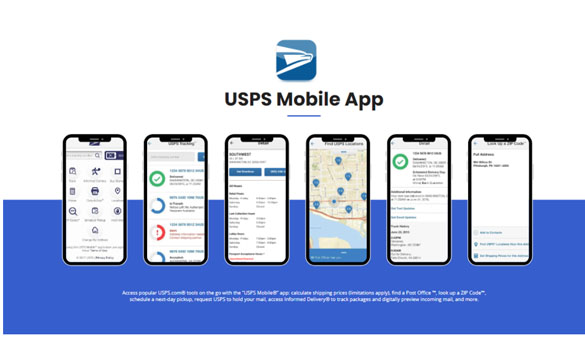
Tracking packages efficiently is essential for timely deliveries and customer satisfaction. With tools like the USPS Mobile application and 17TRACK, you can easily monitor your packages. This guide will show you how to set up and optimize these tools for the best package tracking experience.
The United States Postal Service (USPS) plays a vital role in delivering packages across the country and globally. Accurate package tracking ensures timely deliveries and enhances customer satisfaction by reducing lost packages and inquiries. Tracking packages effectively is a vital component of modern logistics, providing peace of mind to both senders and recipients.
The USPS Mobile App offers a convenient and user-friendly way to track your packages. With real-time updates, notifications, and various tracking tools, the app ensures you stay informed about your shipments. Whether you’re sending or receiving packages, the USPS Mobile App provides easy access to tracking information and streamlined package management.
For those managing packages from 2300+ carriers, 17TRACK complements USPS tracking by offering a centralized platform. With 17TRACK, you can track packages from various carriers in one place, making it easier to manage all your packages efficiently.

Setting Up Your USPS Mobile App
Downloading the App
To get started with the USPS Mobile App, follow these steps:
- For iOS Users: Open the App Store, search for “USPS Mobile App,” and tap “Download.”
- For Android Users: Open the Google Play Store, search for “USPS Mobile App,” and tap “Install.”
After downloading, open the app and follow the initial setup instructions. You’ll need to create an account by providing your email address, creating a password, and verifying your information.
Navigating the Dashboard
The USPS Mobile App dashboard offers a variety of tools to manage your postal needs efficiently. Each icon on the dashboard is designed for easy access and use:
- Track: Instantly check the real-time status of your shipments by inputting the tracking number.
- Informed Delivery: Access digital previews of incoming mail and track package deliveries. This integrated service offers a convenient way to manage your mail remotely.
- Buy Stamps: Skip the line at the post office by purchasing stamps directly from the app.
- Prices: Quickly calculate postage costs for various mail types and package sizes, helping you budget your postal expenses effectively.
- Click-N-Ship: Effortlessly create, print shipping labels, pay for postage, and schedule pickups for your packages. This all-in-one feature streamlines your shipping process.
- Locations: Find USPS facilities nearby, including post offices and collection boxes.
- ZIP Codes: Search for ZIP Codes and associated city names to ensure accuracy in your mail addressing.
- Schedule Pickup: Conveniently arrange for USPS to pick up outgoing packages from your home or office, making shipping as easy as a few taps on your screen.
- Hold Mail: Manage mail delivery interruptions during vacations or extended trips with ease. This feature ensures your mail is safely held until you return.
- Change My Address: Quickly submit an address change request when you move.

By tapping on any of these icons, you can delve deeper into each service, access detailed options, and manage your postal requirements with ease.
Using the USPS Mobile App for Tracking
Inputting Tracking Numbers
Accurately entering tracking numbers is crucial for effective tracking. Here’s how to do it:
- Open the USPS Mobile App and navigate to the tracking section.
- Enter your tracking number exactly as it appears on your shipping receipt or confirmation email.
- Click the button to view the real-time status of your package.
Setting Up Notifications
Stay informed by setting up real-time tracking notifications. Here’s how:
- Navigate to the notifications settings within the app.
- Choose your preferred notification method (email, SMS, or push notifications).
- Customize your notification preferences to receive updates on package status changes.
Using 17TRACK as an Additional Tool
For those managing shipments from multiple carriers, 17TRACK is a valuable addition. Here’s how to use it:
- Visit the 17TRACK website or go directly to the 17TRACK USPS Tracking page.
- Enter your USPS tracking number in the provided field.
- Monitor all your shipments in one place, simplifying the tracking process.

Advanced Tracking Tips with the USPS Mobile App
Utilizing Additional Features
The USPS Mobile App offers advanced tools for enhanced tracking. Here’s how to make the most of these features:
- Saving Tracking Numbers: Save your tracking numbers for easy access to past shipments.
- Advanced Tools: Use the app’s tools to get detailed tracking information and manage multiple shipments efficiently.
Integrating with Other Tools
To further streamline your tracking process, integrate the USPS Mobile App with other tools like 17TRACK. Since 17TRACK is already integrated with USPS, you can simply enter your tracking numbers on the 17TRACK USPS Tracking page for comprehensive tracking.
Troubleshooting Common Issues
Common Problems and Solutions
If you encounter issues with the USPS Mobile App, here are some solutions:
- Incorrect Tracking Number: Double-check the tracking number entered to ensure accuracy.
- App Not Updating: Ensure your app is updated to the latest version and that you have a stable internet connection.
- Connectivity Issues: Check your internet connection and try again. If the problem persists, restart your device or reinstall the app.
Additional Support
For further assistance, consider using 17TRACK for additional tracking support and troubleshooting. Here’s how 17TRACK can help:
- Multi-Carrier Support: Track packages from multiple carriers in one place, reducing the need to switch between different tracking systems.
- Customer Support: Reach out to 17TRACK’s customer service for help with any tracking issues or questions.
Conclusion
The USPS Mobile App provides a convenient and efficient way to track packages, ensuring timely deliveries and customer satisfaction. With real-time updates, customizable notifications, and user-friendly features, the app helps you stay informed about your shipments effortlessly.
For those managing packages from multiple carriers, 17TRACK is an excellent tool to use alongside the USPS Mobile App. It offers a centralized platform for comprehensive tracking, integrating over 2,300 carriers. By using both the USPS Mobile App and 17TRACK, you can enhance your tracking process, helping you stay informed about your shipments at all times.
We hope this guide helps you optimize your package tracking experience. Stay informed, stay updated, and streamline your package tracking with the USPS Mobile App and 17TRACK.